P.S. I'm talking to you too Blizzard... Updating an old install of WoW took over an hour... Sheesh!
Blogged with Flock
Blogged with Flock
 T
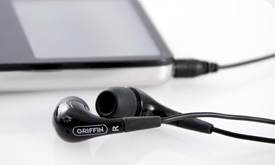
T he EarThumps are fantastic for cheap headphones which kick the crap out of the included ipod buds, but a bit muddy in the low end.
 The JVC's are all around good, with great sound quality, but the rubber that houses the extraneously long cord, [it's a feature, not a bug], gets REALLY dirty, and my friend Josh found out, also breaks apart over time.
 The Philips are not only noise isolating just like the other two, but also have active noise canceling, this is not only good for killing that annoying white-noise pumped into my office, but also drastically improves the sound when turned on.
  The Shure e2c headphones are, for those unfamiliar with Shure's products, very funky looking, and odd to put on. When you hold the packaging it feels like it was worth the money, something that is surprisingly important when you think about the fact that you are dropping a decent chunk of change on a little pair of earbuds. When opening the packaging with a very sharp knife [since it has that really heavy plastic] you behold a veritable onion of red and white plastic. The contents of the package are the e2c's, the hard case, the dozen or so interchangeable ear cups, and of course the all important instructions.
 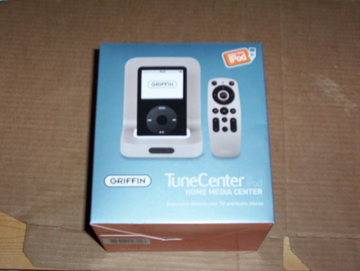 Upon first opening the box, I was impressed that everything seemed to be included and plug and play ready, and for the most part it was, especially since I opted to order the non-wifi enabled version, sticking to the straight forward (and slightly cheaper) wired connection. Having pre-ordered I got a break on the price, and in total (after price, shipping, taxes, brokerage fees) it worked out to be about $125 CDN, which now is @ $129.99 USD but so far it is well worth the current price.
 Having unpacked all of the wires, and hooked everything up I found that the remote didn't work, fortunately, although annoying, it was simply that there was no included CR2032 battery. The only other thing not included was an S-video cable, but that's really a triviality, in comparison to the lack of a battery for the remote. I usually would have no problem with this, as "batteries not included" is not a new thing, but since there was no indication of this before (or after) ordering, and is not mentioned anywhere on the box, or in the documentation. This means that since I didn't open the box until I got up for my "day job" at 9 pm, I had to wait until the stores opened the next morning before being able to get past the opening screen.
 Fast forward to this morning, where I pick up a 2-pack of batteries, and a fancy new iPod case... oddly enough an iClear from Griffin... I get home, and head straight to my desk where I've got the TuneCenter waiting for input from a juiced up remote. Once that was done the fun could begin.
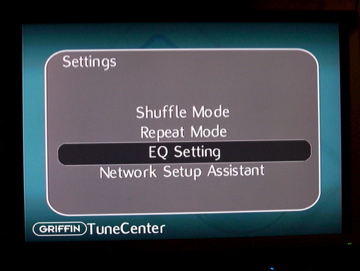 First thing's first, I have to head straight to the settings, just to see how much I can customize my experience. All pretty standard fare here, with the exception of the Network Setup Assistant. This allows you to setup you're connection if you don't use DHCP, or if you need to use a proxy to connect to the internet.
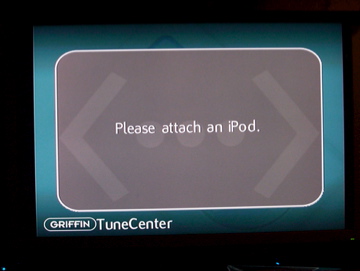 There was however a glitch when selecting the EQ Setting from the setup menu, which no matter which of my iPods I connected it kept telling me to attach an iPod. I hope this can be corrected via some kind of web-update, seeing as it is an internet enabled device.
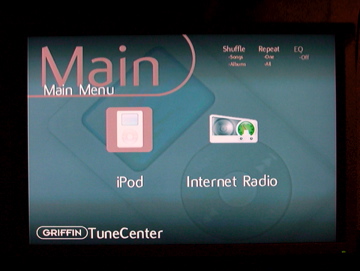
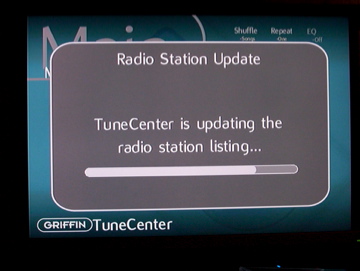 This leads to the internet radio portion, which was nice to see that the listing updated as soon as I selected it for the first time, and I hope it will continue to do so on a regular basis, the 10 seconds to update is worth not having to ever get an error when trying to listen to an unavailable station. Having this capability may seem a little extraneous to some, but if I want to listen to something other than my library it's nice to have, and the iPod doesn't need to be connected for the internet radio to work.
 The number and variety of stations available are enough to suit just about everyone, and any mood, and is just as easy to select as just about anything else in the menus.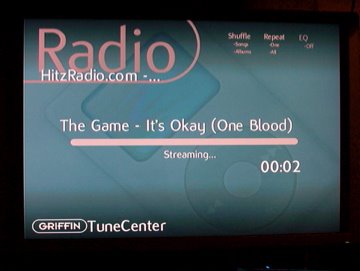

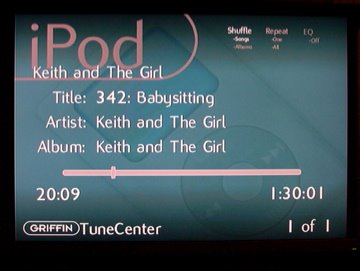 The "Now Playing" screen is much like that of the iPod, with a fancy background, and display of various bits of information, and although I'd prefer to turn off the Griffiin TuneCenter branding in the lower left (since I know what I bought) but it's something that I can live with, at least for now.
Yeah!!! Its acquisition time for me once again. The time of year when I spend butt-loads of money on friends and family. Hopefully, in order to offset my ridiculous personal spending karma.
I decided that this year, after spending much to add some techie goodness to the lives of those around me, I would treat myself to a brand new shiny 15.2" Apple Powerbook, something that I have wanted since getting my Mac mini earlier this year. And those of you who know me, know that I really can't live without my laptop, which just so happens to be a behemoth of a P4 from HP, the same one that I have previously posted about. Having poked around with OSX, and even getting it to work on my P4 tower, (just to see if it really could be done); I felt pretty confident in the OS's capabilities. To this end I'm still fairly correct, at least for my needs. Heck I may just begin to put my WoW subscription to use and not have it waste away unused.
Now that being said, it's the hardware that I have been having the issue with. Firstly there was the moment of unveiling, something that I absolutely love doing with pretty much anything, and apple makes it so that it's almost an event in your own home. The package, (that I had to fight for 2 hours just to let me pick it up at the FedEx depot... another story, sorry), came in a non-descript brown cardstock exterior, this masked a slick black box showing off the different views of the Powerbook a 'la the iPod boxes these days.
When opening the top flap of the box, I had my first hint of foreboding, there were crumple marks in the styrofoam, and a roughly torn circular hole in the top covering under which the accessories/software/documentation were housed. Thankfully nothing appeared to be damaged, and I didn't bother calling Apple about a little cosmetic issue, I'm usually quite patient about such things.
Cosmetics aside, all of the packaging around the Powerbook itself was intact, and unblemished, the problems however began just before TRYING to turn the thing on. One great little touch that I loved about the Powerbook that my co-worker demonstrated was the little button on the battery that shows the amount of charge left in the battery. Mine was showing no charge whatsoever, something that I chalked up to it being new. Apparently this isn't the case at all, and mine was completely dead the OSX "System Profiler" saw the battery as connected, but had absolutely no charge.
I called apple about this right away as it's not much use as a laptop if I can't have it be portable, AND, usable. Not willing to wait I went to the local Apple Authorized dealer, (Westworld Computers, incase you are looking for Mac stuff, they are fantastic there), and bought a new "2nd" one on the spot. The replacement battery came in 3 days, by Purolator of all couriers, and if Purolator... A company that I absolutely loath after the dual-wan router debacle, doesn't get off its collective buttocks, and pick up my dead battery ASAP, I'll be paying 175 bucks for the privilege of keeping it as a testimony of why I still have Windows and Linux boxes all over my place... Maybe I will keep it...
ANYWAYS, if it was only a lousy battery then I would be nothing more than a whiny bastard; Admittedly I am one, but I’m just saying that I’m more than that. Later the same night that I had purchased the new battery, and installed it, the charging was fine. All seemed to be great, for about 2 hours with only poking around with the apple apps, and setting up all my configurations. All of a sudden I look away from it to do my job, and wouldn’t you know it, BAM, frozen! I thought to myself, that there must be a heat issue, and that I was blocking a vent port or something. But no, it was all clear and the bottom of the notebook was a little warm to the touch, but still far cooler than my HP, which made it all the more odd.
I boot up to the install disk, choose disk utility, and select zero out from the security options, no biggie, since I wasn’t able to use it long enough to really set anything up that I would miss. Click, and away it goes. I decide that it’s time to go and have a little cake with my sister for her 13th birthday; it should be done by the time I get back. It got about half way and sat there frozen until I got back. This time I sat and watched the damn thing, while I caught up on my long distance virtual-stalking of
The following morning, (1:30 in the afternoon) I call apple again to advise of the abysmal results. Finally I’m directed to bring it in to an apple repair dealer, only 6 days in my frustrated hands and I’m already taking it to a repair shop, there is something horribly wrong with this situation. Back to Westworld, as they are also a repair center, this time to drop off rather than pick up, even though I did a bit of that too. After giving all of my particulars, and some more of my money to the good people there, I stopped off for some Christmas Blend @ Starbucks, and traveled the return hour home to the glow of my fully functional HP laptop, and mini that will be shunned until my PB is finally all well.
And now only eleven days after getting it, I’m likely going to be waiting another five before I know if it’s going to stay a brick or not.
All I can say is that they better not blame the RAM. I’m pissed enough as it is that they want to charge well over $300 for a bloody 1GB stick of RAM. I’m fine with the fact that they are a boutique computer manufacturer, but they don’t make the RAM, they only buy and install it. Apple… If you don’t want people to be able to upgrade anything themselves, and force them into paying ridiculous prices for your memory, then seal up the box like the mini. Some will be adventurous, but most will pay, and then the cost is justified by having a “Trained Technician” install it.
My faith in Apple was based on the outstanding performance by my mini, and the stellar iPod, (even with the issues on my 5G). By the end of this week I should know if my faith was misplaced, or if it was an isolated incident. At this point I wish I went with the ASUS MCE laptop that I nearly got. Oh well, what’s another week… right…
Here’s hoping Apple doesn’t screw me over,


